






Activating Sins: Rebellion (or any Stardock game / software on Steam) Through Steam
 JoeUser Forums
Download Steam - http://store.steampowered.com/
You can find your Rebellion key in your Stardock account or in your e-mail.

Or by using the following with the email you purchased from Stardock with.
https://www.stardock.com/support/product-key-retrieval
If you purchased from another software partner, you will have to refer to your receipt from them or contact them directly.
Once you have your key and Steam installed, open Steam. At the bottom left click ‘Add a game’ and select ‘Activate a Product on Steam’.
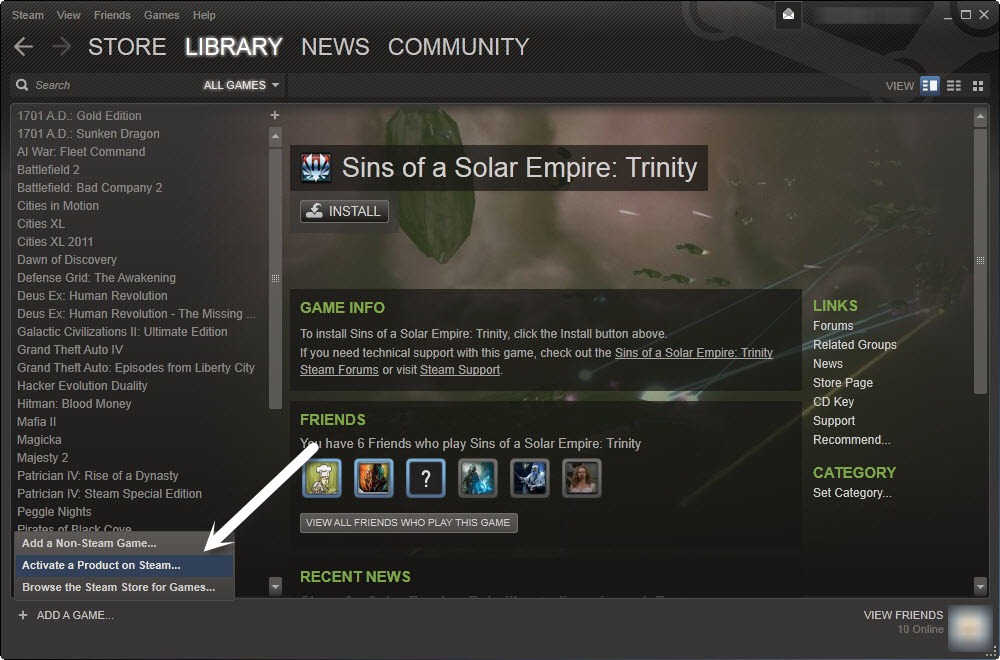
Next you have a new window with a couple of screens with agreements, instructions, etc. You will then be prompted to enter your key.

After that, you will get confirmation and install info screens.
 |
 |
That’s just about it. You can click the downloading area at the bottom of Steam to open up your downloads, and you can also view them from your Steam library.

 Sins Forums
 Stardock Forums