Sins of a Solar Empire : Real-Time Strategy. Unrivalled Scale.
© 2003-2013 Ironclad Games Corporation Vancouver, BC. All rights reserved.
© 2006-2013 Stardock Entertainment

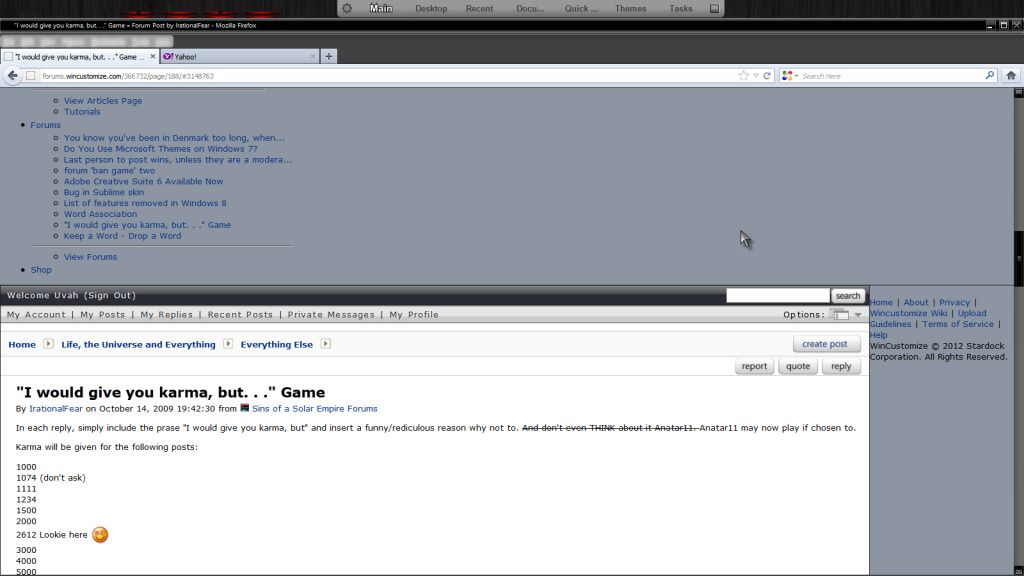
Pages are whacked....

browser vor forum issue?

By on May 8, 2012 8:52:10 PM from WinCustomize Forums WinCustomize Forums

Uvah

Join Date 05/2006
+660

This only happens here. I tried rolling back to a previous version of FF and I tried clearing the cache and cookies. Nothing has changed. What happened?

18 Replies
Search this post
Subscription Options


Reason for Karma (Optional)
Successfully updated karma reason!
May 8, 2012 8:59:21 PM from WinCustomize Forums WinCustomize Forums

You cleared the cache and cookies, you probably did close and reopen the brower, right?

Reason for Karma (Optional)
Successfully updated karma reason!
May 8, 2012 9:19:31 PM from Sins of a Solar Empire Forums Sins of a Solar Empire Forums

I had to swap to Chrome for the forums--every since the last forum maintenance, FF was bjorked with them.

I couldn't give karma or edit my posts or use any of the board buttons.

Reason for Karma (Optional)
Successfully updated karma reason!
May 8, 2012 9:35:50 PM from WinCustomize Forums WinCustomize Forums

Working fine here in the latest FF. Using any addons?

Reason for Karma (Optional)
Successfully updated karma reason!
May 8, 2012 9:59:22 PM from Sins of a Solar Empire Forums Sins of a Solar Empire Forums

I tried disabling add ons, completely purging, uninstalling and removing all traces of FF and re-installing it again.  Running in safe mode-with no plugins--didn't help.

I was also having to manually refresh pages--when I hit links I'd have to page back and then page forward again to get the page displayed.

Reason for Karma (Optional)
Successfully updated karma reason!
May 8, 2012 10:07:00 PM from Sins of a Solar Empire Forums Sins of a Solar Empire Forums

Odd, I am running FF just fine.

Reason for Karma (Optional)
Successfully updated karma reason!
May 8, 2012 10:28:18 PM from WinCustomize Forums WinCustomize Forums

PaleMoon 12 ok here.

Reason for Karma (Optional)
Successfully updated karma reason!
May 8, 2012 11:21:45 PM from WinCustomize Forums WinCustomize Forums

Quoting Ryat,
Odd, I am running FF just fine.

Me too... and I'd never have that Chrome POS on my rig.

Reason for Karma (Optional)
Successfully updated karma reason!
May 9, 2012 12:19:47 AM from WinCustomize Forums WinCustomize Forums
Uvah: Uninstall it. Download the latest, and stop mucking about! You're just looking for trouble.... Successfully, I might add.
Reason for Karma (Optional)
Successfully updated karma reason!
May 9, 2012 5:41:28 AM from WinCustomize Forums WinCustomize Forums

Quoting DrJBHL,
Uvah: Uninstall it. Download the latest, and stop mucking about! You're just looking for trouble.... Successfully, I might add.

I have the latest FF, that's when it started. I rolled back to version 11 then opened FF and it went right back to version 12, updated itself. Funny thing is it doesn't happen right away. See reply #4....same thing happens to me regardless of what version of FF I use. Always did that but only on WC. Doesn't happen on any other site.

Reason for Karma (Optional)
Successfully updated karma reason!
May 9, 2012 6:13:04 AM from WinCustomize Forums WinCustomize Forums

Looking the screenshot, I think the main issue is caused by that Yahoo! tab that are open


Kidding... ok, have you tried to load a different WB skin? Maybe it's FF fighting a visual style

metric setting or something, would need to close FF, load a different skin and reopen FF to test.

Reason for Karma (Optional)
Successfully updated karma reason!
May 10, 2012 8:56:36 PM from WinCustomize Forums WinCustomize Forums

Switched over to Chrome in the meantime. Will check it out and let you know.

Reason for Karma (Optional)
Successfully updated karma reason!
May 13, 2012 12:24:40 PM from WinCustomize Forums WinCustomize Forums

no problems here.

Reason for Karma (Optional)
Successfully updated karma reason!
May 13, 2012 1:07:40 PM from WinCustomize Forums WinCustomize Forums

Uvah, I figured out what happened... cos it happened to me

You were cross-eyed

Anyhow, to fix it, tap yourself on the back of the head [to realign the eyes] and all should be fine.

Reason for Karma (Optional)
Successfully updated karma reason!
May 13, 2012 2:22:29 PM from Elemental Forums Elemental Forums

Quoting Uvah,

I have the latest FF, that's when it started. I rolled back to version 11 then opened FF and it went right back to version 12, updated itself. Funny thing is it doesn't happen right away. See reply #4....same thing happens to me regardless of what version of FF I use. Always did that but only on WC. Doesn't happen on any other site.

One more thing to try: a new profile.  Your profile is what stays constant across reinstalls, and it's what is different in your install from others.

Start firefox with -profilemanager to creat a new one.

This will have you running without anything that may have been corrupted in your profile or that you may have changed without noticing. It also starts without addons.

Oh, and if that also doesn't help, you may want to try a beta/aurora/nightly build to see if a future version will get better. Even the nightlies are usually stable and usable.

Reason for Karma (Optional)
Successfully updated karma reason!
May 23, 2012 10:49:02 AM from Stardock Forums Stardock Forums

I am unable to recreate your issue. Seeing as you've already cleaned and re-installed Firefox, the only other possible cause of the problem is something else on your computer. Some software may be installed that could be interfering. Do you have anti-virus installed? Try disabling it. Don't have it installed? Try installing one and doing a system scan. Your firewall could also be preventing some traffic (such as images) from coming through. I couldn't tell you why it is only affecting our forums, but sometimes weird stuff can happen.

Bara

Reason for Karma (Optional)
Successfully updated karma reason!
May 23, 2012 2:46:54 PM from WinCustomize Forums WinCustomize Forums
Actually FF has been behaving itself, haven't had the issue in awhile. But then again an update may have slipped by when I was using Chrome.

Reason for Karma (Optional)
Successfully updated karma reason!
May 23, 2012 3:07:19 PM from WinCustomize Forums WinCustomize Forums

Just for general information, we have satellite out here because it is all that is available. When it is acting up, the pages load like in Uvah's example but when it is working properly they do not. Perhaps the problem is a faulty web connection and not an issue with FF. It is always my first indication that WildBlue is having issues with the satellite, AGAIN!

Reason for Karma (Optional)
Successfully updated karma reason!
May 23, 2012 3:23:36 PM from WinCustomize Forums WinCustomize Forums

Very possible as I use wireless and outside is a microwave tower.

Reason for Karma (Optional)
Successfully updated karma reason!
Stardock Forums v1.0.0.0    #108434  walnut1   Server Load Time: 00:00:00.0000344   Page Render Time:


