Hynkel Hynkel

Sins makes computer turn off

Sins makes computer turn off

    When trying to play a LAN game, one of the computers turns off within .5-3 minutes. The same computer turns off everytime. No other game crashes with this computer. Call of Duty 4, among many other games, works flawlessly with this computer. The computer is about a month old. It has a dual core 2.66GHz processor, NVIDIA 8800GT, 2GB RAM. It is running Vista 32 bit. We have tried with the antivirus disabled, so this is surely not the problem. This problem did not occur with version 1.02, so I am inclined to think that it may have something to do with 1.04. We have uninstalled and reinstalled Sins with no change. Again, this problem only occurs when playing Sins and happens in the first few minutes of starting a game. The computer has been blown out to remove dust, and all components of the computer were checked to be sure they were in properly.
    Is this heard of? Any idea how to fix this? 
20,846 views 49 replies
Reply #26 Top
I guess when I get the chance next weekend I will swap parts between computers and isolate the problem, and if the problem continues then would that show it is a software problem?
End of quote


If you swap the HD into his computer, and it continues there, its probably something with the software on the HD, yes -- assuming the HD itself doesn't have a problem (run scandisk on it... :D ). However, that will still leave the possibility that your OS is screwed up to contend with so its hardly a final diagnostic step.
Reply #27 Top
If you are comfortable swapping hardware and the like why can you not figure out memtest?

Sure the machine are built identical, but is eveyrthing installed ont hem identical aswell?
Long story short, it could be software or hardware, thats what diagnosis is for. And Ironclad/Stardock will not replace the cd if it is proven to work on a machine as you have stated.. if you really want to iron out any other software then back up, format the computer install windows and fresh drivers and then just install and load sins nothing else.
If it still does it it is hardware and you will have to diagnose more or take it to a shop for troubleshooting.

The 2 possible reasons that are likely after software are allready stated, Memory and Power.
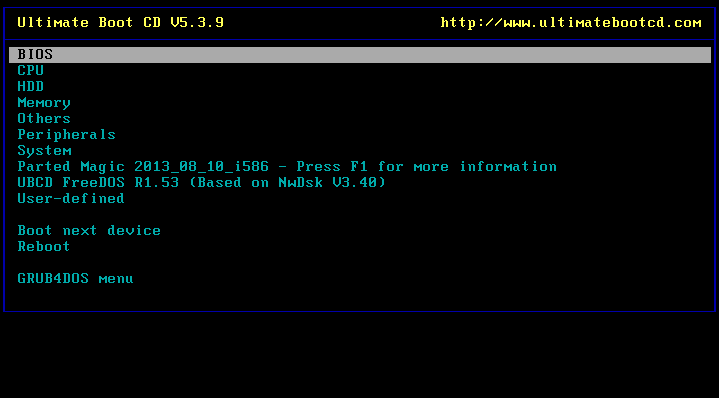
get Ultimate boot cd - http://www.ultimatebootcd.com/ download the .iso image, burn it to a disk with Nero or something and restart your machine witht he disk in.. it is a bootable cd so will load up before windows starts.. just tell it to do memtest and sit and wait

It can also test your CPU and hard drives, do them all.
Then tell us what you find.
Reply #28 Top
Like I've said, if it were a hardware problem, would this not happen with the dozens of other games that are played on this computer?
End of quote


"It depends".

It depends on what exactly the problem is -- Sins might just be the only software you run that uses a specific feature in a specific way, which then generates the instability that shuts you down. Lets just say that most games use features X Y or Z on your video card to render their screens, but Sins uses Feature X and Y. If, for some reason, your card is defective so that X and Y can't be used together, only Sins would "pick up" on that problem.

(This is way oversimplified, but you should get the idea...)
Reply #29 Top
I know you have successfully ran Call of Duty and other latest games...but have you try running them recently? What if your computer was just fine, until recently something happen? Go play some other video card heavy game ONLINE OR LAN for an hour, see if it crashes.

Reply #30 Top
If you are comfortable swapping hardware and the like why can you not figure out memtest?
End of quote


I know how to build computers, my friend downloaded the program and said he could not figure it out, he tried looking at the readme, however, it would only open on notepad and was in an awkward format to read.

And Ironclad/Stardock will not replace the cd if it is proven to work on a machine as you have stated
End of quote


This is a separate copy of the game. And I believe it worked prior to us downloading v1.04.

I know you have successfully ran Call of Duty and other latest games...but have you try running them recently? What if your computer was just fine, until recently something happen? Go play some other video card heavy game ONLINE OR LAN for an hour, see if it crashes.
End of quote


We played CoD4 for a couple hours LAN with 6 other computers this weekend and it worked fine. We also played NWN2 LAN for hours, also this weekend, with no problems. We have been playing many recent and demanding games for hours, this is what we do on the weekend. Yet Sins is the ONLY one we have a problem with.


It can also test your CPU and hard drives, do them all.
Then tell us what you find.
End of quote

I'll do this and let you know how it turns out once I have done so.
Reply #31 Top
The problem is your running vista.
Reply #32 Top
The problem is your running vista.
End of quote


All the computers are using Vista, and there is only one computer with the problem :P
Reply #33 Top
Run memorytest 86+ not windows memory diagnostics.

http://www.memtest.org/
End of quote


Ok, lets try this again, which download should I get, there are about 50.
Reply #34 Top
Out of curiosity, have you tried reducing the Sins in game video options? I've seen where some video cards end up (in some situations) trying to access memory outside of what Windows expects, and this causes Windows to shut down.

Although it seems significant that none of your other games crash your computer, it's difficult to compare games when looking at the actual demands put on your video card and drivers...

Regards,

WC
Reply #35 Top
Just get the ultimate boot cd..
burn it to a disk and reboot your pc with it in..
It has memtest on it, it will load up like a bios screen and ask what you want to run.


If i remember it is on mainboard tools. there are 4-5 different memory tests, choose memtest86+ and just run it on default settings, this will take some time to run, and will halt on any errors.Might be worth running Prime also.

There is also some boot level anti-virus/malware programs on there, run them also to see if it finds anything (Can find stuff window sbased scanners can't)
Reply #36 Top
Out of curiosity, have you tried reducing the Sins in game video options?
End of quote


Yeah that is one of the first things we tried.
Reply #37 Top
I guess when I get the chance next weekend I will swap parts between computers and isolate the problem, and if the problem continues then would that show it is a software problem?If you swap the HD into his computer, and it continues there, its probably something with the software on the HD, yes -- assuming the HD itself doesn't have a problem (run scandisk on it... ). However, that will still leave the possibility that your OS is screwed up to contend with so its hardly a final diagnostic step.
End of quote


Unless the hardware is EXACTLY identical all but gfx card, dvd/cdrom(though this can cause problems too) HDD, ram, PSU, and sound card(though if moving from machine WITH creative sound card to machine WITHOUT, this can also cause problems), IE: Same bios version, same CPU model, exactly the same mobo etc, it will almost certainly cause problems. And since its vista theres a pretty good chance it won't work too well if anything at all is different. XP is not AS picky about its drivers, but can be a bit anal at times as well.

That said, I wouldn't use that as a diagnostic step at all to begin with... start swapping out components, RAM, GFX card, try running with just 1 stick of ram if you have 2 installed.

Theres a literal plethora of things random shut downs could be... most of the time its a cooked PSU or a cooked windows install, but then theres a pile of other things it could be too. And yes, even though your playing other games, your PSU could be cooked. Sins when loading slams everything to the wall, and sucks more juice than any other game on the market is likely to. The only other one I can think of off hand that MIGHT come close is medieval 2: total war, when loading up a large battle. nothing else really comes close to throwing as much data at the computer as fast as sins does.

To give you an idea on the PSU btw, a 1 year old PSU thats been on 24/7 with heavy use will have an aproximate max load of 85-90% of what it could originally do, 2 years and its down to around 70-75%, 3 years and its usually cooked, or down to around 65%. These are general numbers of course, and actual performance will vary by brand name/model/pure luck. NOTE: Modular cable PSUs have a tendency to degrade even faster, they're down to the 85-90% mark after 6 months, max. This is not true for ALL modular PSUs, but it is true for most, which pisses me off b/c modular cables was the best thing I've seen in a long time :/. Also note that actual stock max wattage is usually +/-15 to 25% of stated/branded max, depending on brand name/model. Enermax has a good track record of generally going into the + side.
Reply #38 Top
Unless the hardware is EXACTLY identical all but gfx card, dvd/cdrom(though this can cause problems too) HDD, ram, PSU, and sound card(though if moving from machine WITH creative sound card to machine WITHOUT, this can also cause problems), IE: Same bios version, same CPU model, exactly the same mobo etc, it will almost certainly cause problems.
End of quote


They are EXACTLY the same. Same GPU, PSU, CPU, RAM, optical drive, HDD, both use on board sound, and exactly the same mobo. They are literally both built identically.
Reply #39 Top
Want to hear something odd? The first time I installed Sins on my computer, and ran it, I got the blue screen of death. Then after trying to restart my computer, it could not find the hard drive??? After hours of trying to restart it, it finally "saw" the hard drive, and the computer started again. Out of paranoia, I tried starting/playing several of my other games, which all worked fine. Then I ran Ad-aware, Spy-Bot, and Nortons Antivirus, all which came up negative. So when I tried to play Sins again finally (crossing my fingers and flinching), I get TBSOD again??? But the computer did reboot right up. I tried registering my copy of Sins then, but was unable, so had to write tech support. They said they "fixed" it, and low and behold I could register my game. Then when I started it, it worked fine, with no BSOD, and I've NEVER had that problem since (or before, for that matter).

A friend of mine swears up and down it's all because of some copy protection program they use (he told me the name of it, but I forget what he said), but I thought Sins had no copy protection???

But anyway, no problem since (crosses fingers).
Reply #40 Top
Anyways, until next weekend, there will only be 2 computers that I can test this problem on, and right now as they are both in a LAN game, the problematic one does not seem to want to turn off as it has been doing. So I cannot recreate the problem, so I would not be able to tell if what I do to it fixes it. When I get friends on the LAN with thier computers the problem will probably reoccur and that is when I switch HDDs and run the Ultimate Boot CD.
Thanks for the help so far, I will let you know what happens when I get the chance to do the things suggested, (probably Friday).
Reply #41 Top
A friend of mine swears up and down it's all because of some copy protection program they use (he told me the name of it, but I forget what he said), but I thought Sins had no copy protection???
End of quote


Sins has no copy protection, correct. So either your friend is paranoid (justified given most gaming companies behavior, see next option...) or he's thinking of another game, like BioShock (rootkit based DRM), Crysis (crippling disk DRM), etc etc etc.
Reply #42 Top
Well, technically, I guess there is no copy protection in Sins. BUT, if you've got to register it, with a serial #, and it only allows you two installs (I have 3 computers here, and a laptop makes 4). So that seems pretty "copy protectionisk" to me. . .

I still have the Gal Civ II box on my desk; have not been able to play it since I got a new computer (and now a new email, which seems to double the game's insistance that I pirated it). It never entered my mind getting a new computer would prevent me from playing a game I had already been playing for weeks. Spent weeks trying to get tech support to iron things out, but finally through up my hands. That's far worse than any "copy protection" I've had to deal with before. . .


Reply #43 Top
Well, technically, I guess there is no copy protection in Sins. BUT, if you've got to register it, with a serial #, and it only allows you two installs (I have 3 computers here, and a laptop makes 4). So that seems pretty "copy protectionisk" to me. . .
End of quote


There is no copy protection on the disk, or on the program. Merely teh requirement for a "CD Key", and you can install it to all of your own computers if you want.

I still have the Gal Civ II box on my desk; have not been able to play it since I got a new computer (and now a new email, which seems to double the game's insistance that I pirated it). It never entered my mind getting a new computer would prevent me from playing a game I had already been playing for weeks. Spent weeks trying to get tech support to iron things out, but finally through up my hands. That's far worse than any "copy protection" I've had to deal with before. . .
End of quote


And extremely odd. Technical support is usually pretty good about things like that.
Reply #44 Top
I am having a similar problem. It only occurs though when I host a game. If I host a game, the instant I hit START....my machine reboots. Here's the funny part, if I join a friends game, or another random game, I do not reboot. I will get a minidump within an hour or two, but no rebooting.

Again, if I attempt to host a multiplayer game..it reboots when I start the match. I made it once into the game, but within about 10 minutes my PC reboots.

This is THE ONLY game I have that exhibits this problem. I have 2.5GB of memory too and all tests good.
Reply #45 Top
Unless the hardware is EXACTLY identical all but gfx card, dvd/cdrom(though this can cause problems too) HDD, ram, PSU, and sound card(though if moving from machine WITH creative sound card to machine WITHOUT, this can also cause problems), IE: Same bios version, same CPU model, exactly the same mobo etc, it will almost certainly cause problems.They are EXACTLY the same. Same GPU, PSU, CPU, RAM, optical drive, HDD, both use on board sound, and exactly the same mobo. They are literally both built identically.
End of quote


Same here - except worse. I am almost certain it was the video card and SINS working together (NVidia, of course). I am also running Vista. What happened to me is that the game kept stalling, and then it would just pick right back up after the computer resolved whatever conflict there was. When I quit the game, I saw the NVidia error messages - there were several as the game stalled several times.

When I shut down my computer, that is the last time I saw it in that form. I tried to turn it on again in the morning, and it could never get to the OS again. The blue screen of death. So, I had to erase everything and reinstall Vista. Total PIA.

So, after reinstalling everything, I updated the NVidia driver - but not with the latest beta driver. That one tells me I am either running 64bit (which I am not), or tells me that it has "found no compatible drivers" for my OS. Regardless, the game still works in single player mode. Have never tried multiplayer. I still get the stalling in game - sometimes several stalls in a row, but the game never crashes, and my computer has never been screwed like the first time it happened - know on wood.

Anyway, the game is at least working for now, but I still get the stalls and error messages. SINS definitely pushes my computer to its limit - but it's worth it. Freaking great game, but if it caused a reboot, then that would suck. Sorry I couldn't be of more help. But I thought I would share my nightmare as well.
Reply #46 Top
yes already reinstalled. Fans are working, as is the PSU, like i said, how could that be the problem, the computer runs for hours playing many other games. Even when the computer has first turned on, we try to play the game,yet there is the same problem.
End of quote


I had a pain in the ass problem simaler to this when i first built my current comp. Id get the BSOD only while playing EVE. I tryed different video drivers which helped soom but didnt cure it. So tryed different bios's and setting mem tested ect and still no good. Tryed a few different mobo drivers and bigo that fixed the problem. It might be a driver conflict or bad drivers for mobo sound card ect.
Reply #47 Top
When I started this thread, my computer was turning off in the first couple minutes of the game every time I tried to play a LAN game...this has not happened since last weekend when it occurred about ten times. I have no idea what was causing it, I did not touch the hardware, but I'm not complaining.
We were able to get through about 3hrs 45mins of a Sins game with 6 people until I eventually got the mini dump that we have always been getting around this time. This has at least remained consistent.
Reply #48 Top
Wow... so many problems with Sins. Strange then, that I have a Vista Compaq (don't know the actual specifics, not good w/ technical stuff) that has less RAM than the game requires, and it works fine. I mean, I have to keep all visual stuff on low to not have it freeze, but it works fine on normal settings.

Your problem seems bad, but I am glad to see that it fixed itself.
Reply #49 Top
I have an nvidia 8600GT and I will be honest with you I have researched sli and non sli mode for months and the nvidia latest drivers are terrible atm, the top notch cards are getting fixes but the budget ones arent. I know thats a bold statement but my friend has a top notch card and gets minimal problems and I had to use the NGO drivers to solve various bugs in games. (Thankfully thus far sins seems to be running fine though). Im actually into software development but still class myself as a newbie with lots to learn :) but I have also run memtest and lots of other things to verify memory is okay, also in games I have found the realtek HD audio drivers to be buggy and the cause of many problems , fact is tracking down the causes can be a major hassle and take a long long time with some of the more stubborn ones. I bought a new machine a few months back and am just starting to get acceptable all round stability now, the fact I play many games and apps I put the drivers through their paces and some of them still need work, just to mention and slightly offtopic I noticed the sins devs mentioned about the sync issue and stated words to the effect "if you have problem x,y and z its not your network , drivers etc. Thats the first time Ive seen a company not immediatly telling users they all have faulty hardware so I would try and get some more advice on these forums because other places will have you buying components that may not fix the issue )

I hope you get your problem fixed and I may be off the mark but honestly Ive had nothing but trouble from the most recent nvidia drivers and yes I can run the vast majority of my games flawlessy as well but nvidia drivers in the past were much more stable in my opinion.