Nacey Nacey

[MOD] Distant Stars - Rebellion Alpha 0.13 Released! [17/06/13]

[MOD] Distant Stars - Rebellion Alpha 0.13 Released! [17/06/13]

http://distantstars.mmobase.com


Feedback of any kind is always welcome. Ideas, balance changes, and bug reporting of any kind is always useful!

Version 1.00 Released!

Make sure to ask for permission before republishing any part of this mod to the public!

Downloads

Rebellion Logo

1.05 + DLC Compatible:

0.12 ALPHA Release:
Full Download:
http://distantstars.mmobase.com/rebellion/Distant_Stars_(R)_ALPHA_0.13_[45189661].7z

Full Download MIRROR:
http://www.moddb.com/downloads/distant-stars-rebellion-alpha-013

MD5: 69486D2FCD3F35E46E6F5EF8C9F1634A

Diplomacy Logo

1.34 Compatible:

1.01 Release:
Full Download:
http://distantstars.mmobase.com/diplomacy/Distant_Stars_(D)_1.01_[45685832].7z


Entrenchment Logo

1.051 Compatible:

Beta 0.9951 Release:
Full Download:
http://distantstars.mmobase.com/entrenchment/DS_Entrenchment_Beta_0.9951_[36672852].7z

SoaSE Logo

1.14 - 1.181 Compatible:

Version 1.01:
Full Download:
http://distantstars.mmobase.com/soase/Distant_Stars_v1.01_[453701567].7z

Make sure to ask for permission before republishing any part of this mod to the public!

Multiplayer Games:
We've setup a thread for everyone to organise their multiplayer games in and also setup example times and dates for most people to meet up and start games. These are what we hope to be the main times for people to be around and want to play games together.

The times are:
4pm EST (9pm GMT) Saturdays & Sundays
9pm EST (2am GMT)
Saturdays & Sundays

If you want to organise other games please go ahead using the same topic to consolidate all the information in one place and hopefully get more games together within our community. These games are for PvP, PvAI & PvPvAIso come along and we'll get some games going!

Screenshots:
We've setup a thread so you can all post your screenshots to share with us the Distant Stars team and its players. Im sure we're all intrigued to see what kinds of battles and events you've all been having on the mod aswell.

Lore:
We know some of you guys love to role play whilst using Distant Stars, and here's a topic for you guys to post all of your role playing stories, character profiles and anything else you can imagine.

Maps:
Some of you avid map makers out there have produced some great maps but never really had them recognised because they've got lost. Well here's a topic for you to post a link to the download (we can even provide mirrors if necessary) a screenshot or two of the map for us all the preview and if enough people like it we'll even include the map in with the actual mod!

Please visit our website and for more information, change logs, downloads, and to report bugs. Our website can be found here: http://distantstars.mmobase.com

Bug Reporting

If you want to report a bug please use the Bug Report feature on our website:
http://distantstars.mmobase.com/?m=reportabug

Please include as much information as possible, if you have an error log feel free to post it on these forums and we'll take it from there. If you can reproduce the error please include the error log (read below to find out how to enable error logs) and include as much detail on how to reproduce the problem.

To enable logging:
Windows Vista/Windows 7:
C:\Documents and Settings\<Your Windows Username>\Local Settings\Application Data\Ironclad Games\Sins of a Solar Empire\Setting
or
Windows XP:
C:\Documents and settings\<Your Windows Username>\Local Settings\Application Data\Ironclad Games\Sins of a Solar Empire\Setting

Open the user.setting file (using Notepad, Wordpad or any text editor) and scroll down to the bottom 7 lines from the bottom is the line:
LogOutput FALSE
Change FALSE to TRUE
LogOutput TRUE

and from then on any Log files will be saved to the debug folder:
Windows Vista/Windows 7:
C:\Documents and Settings\<Your Windows Username>\Local Settings\Application Data\Ironclad Games\Sins of a Solar Empire\Debug
or
Windows XP:
C:\Documents and settings\<Your Windows Username>\Local Settings\Application Data\Ironclad Games\Sins of a Solar Empire\Debug

If you get these log files to us (you can just paste them in to a forum post) we can hopefully get your issues sorted.

Frequently Asked Questions

All files are compressed using 7Zip to shrink the download filesize. To extract these files you must use WinRAR or 7Zip.
Any Patches should overwrite the original install directory, either by extracting over the original folder, or cut/copy & pasting over the existing file/folder structure.

1) My game keeps crashing, is there anything I can do to stop it?
i) Are you running the game on maximum (highest) settings? if so, lower them to High or Medium, there is a known issue with the game using up too much memory, there is nothing we can do about this, also no matter how powerful your pc is, it is affected by this issue no matter the pc it is not above this crashing issue, it is a game problem not a hardware one, so quite simply lower your settings. If you still have an issue with crashing see point two.
ii) Give us as detailed information as possible about the crash, what was happening at the time of the crash, what races, ships, abilities were involved. If you can supply a Debug Log (see above for more information about logging) and post a bug report on our website.

2) The loading screens and portrait pictures dont appear properly, whats wrong?
i) This is an issue with ATI based graphics cards (rarely affects Nvidia based cards) we're looking in to the issue.

3) Why dont you support converting Distant Stars in to TXT format?
i) Quite simply many things can go wrong with converting your mod to TXT, we cant help you with something you've probably broken yourself.

4) Can I mod Distant Stars for myself?
i) Yes you can however please do not distribute our mod or our mod that you have edited to the public. You must ask for permission to do so, we will regrettably stop distributing our mod to all if users abuse our work.

5) Your mod is in BIN format I can't edit the files, what can I do?
i) You can convert the mod to TXT format however we wont offer any support to versions of the mod that have been converted to TXT.

6) Why is Distant Stars distributed in BIN format?
i) Mods load faster in BIN format and are less likely to have issues in this format.

7) I'm having trouble installing the MOD, do you have any more instructions?
i) Carbon was kind enough to do some more advanced instructions out here.

8) Is there any way to make new maps for Distant Stars using GalaxyForge?
i) Within the Distant Stars Extras folder there is a folder called Galaxy Forge, Copy and Paste this folder (or its contents) over your original Galaxy Forge folder (or its contents) replacing any files if it asks you to. When you start Galaxy Forge next you'll be able to use all of our planets.

Or, the DIY approach (without custom icons):

ii) The GalaxyForge supplied by the devs will still work with our Mod, however to be able to access all of our planetary bonuses, templates, planet types and stars you will need to take our GalaxyScenarioDef.galaxyScenarioDef (found in the GameInfo folder of the mod) and place it in to your GalaxyForge folder, overwriting the original GalaxyScenarioDef.galaxyScenarioDef (if you still wish to make maps for the original game keep a backup of the original file). This will allow you to use all of the Galaxy changes included in our mod.

Note: Any maps made for Distant Stars will not work with other Mods. See #8.2 for DIY instructions for map making or take the appropriate files from Entrenchment, they're cross-client compatible.

Some statistics...

Since August 2009 to February 2011 we have had over...

400,000 Unique visits to the website
12,000GB (12TB) of data transferred from our website

That equates to over 60,000 Unique downloads of the entire mod, excluding the excess of 20,000 Patches downloaded. 

Thanks to everyone that has supported us this far and making our mod as popular as it is!

dyMRNwSFh9gw
15,657,522 views 8,423 replies +31 Loading…
Reply #4151 Top

Quoting XATHOS, reply 4148
I was doing my usually changes for my LAN group, and I noticed that the gunships had no description entry.  Your string file is off by 5 strings.  It should read 7110, not 7105.  That fixed the problem.
End of XATHOS's quote

Thanks for the Info. Will pass on to Nacey

Quoting chanter45, reply 4149
Can one of you fancy mod creators show us how to fix the planet wrap problem? Or should I just suck it up until your guys next update?
End of chanter45's quote

You can simply copy over the files from the original over the mod. Or just remove those planet texture files I believe.

Reply #4152 Top

I just went through the textures for \Distant Stars (D) Beta 0.7 and the latest SoaSE planet texture is from 2009 which is before TSOP. TSOP started March 15, 2010.

What planets are giving the problem? Its been a long time since I looked at them in XSI or do I need a different version?

Reply #4153 Top

Or just remove those planet texture files I believe.
End of quote
and the mesh files as they have UV's for those textures.

@ MyFist They have a newer version out which includes the TSOP planet mesh's & textures I believe.

Reply #4154 Top

To my knowledge it's all the planets I think? I've seen ice/terran/volcanic all have the problem...

Now since i'm kinda gimpy computer wise i'll just wait for you guys to patch it up

Reply #4155 Top

Quoting Pbhead, reply 4144
oopsies. shoouda seen that comin.
Quoting IHaTeD2, reply 4141I played alot of Games and the other Factions are everytime much easier.


And yes - i do. =/


As soon as the mod is fixed again... lets find a time and do some fighting.  it'll be fun!
End of Pbhead's quote


Sorry only Singleplayer ... :D


The Planets are a bit ugly with this Glitch yes but i dont think its so important trying to fix it by myself.


Edit: Wow, 1,08GB ... O_O

Reply #4156 Top

It's the original planets, their tops appear as if they are rotated 90 degrees in most cases, and the skyboxes in some cases have noticeable lines at the poles.  As I said a page ago, going back to the originals fixes the issue, or you can delete them and the game will auto revert to the originals as Ryat stated.

Fixing them by yourself is actually simple, and if you don't care to delete the offending files, I'll give the planet ones to all who may be concerned.  Make sure you get both archives.

http://sites.google.com/site/steelers086/gamefiles/TextureFixA.rar

http://sites.google.com/site/steelers086/gamefiles/TextureFixB.rar

Here's the instructions.  Go to your mod folder, I assume since you're playing the mod you know where that is, access your texture folder, copy these files in, overwriting the others.

Fixed.

Simple.

Enjoy the prettiness.

=]

Reply #4157 Top

Quoting IHaTeD2, reply 4155


Edit: Wow, 1,08GB ...
End of IHaTeD2's quote

A lot of that is "pretty" music (a lot is good) from our resident music hound Carbon!

Reply #4158 Top

A lot of that is "pretty" music (a lot is good) from our resident music hound Carbon!
End of quote


Which ones are bad?


I could of added another GB easy btw. My mod has 3 GB of music alone.

Reply #4159 Top

Thanks Stant! I can indeed follow those rules, gotta finish up one more test before I head home then I can fix my planets back up again.

Also the music is damn awesome in this mod.

Reply #4160 Top

This mod is the most beloved mod of any game my LAN group has ever played. It's been that way for well over a year now ... just wanted to let you all know that all eight of us give guys a big thumbs up!

Reply #4161 Top

Hm... I'd love to try the latest version, but I bet if I update I'll effectively kill all the other mods :S

So I'll hold off for now... keep up the great work guys :)


Reply #4162 Top

just a stupid question... how can i get the 1.19Beta Patch? I´m using Impulse...

#

greets

dennis

Reply #4163 Top

Quoting therealjcool, reply 4161
Hm... I'd love to try the latest version, but I bet if I update I'll effectively kill all the other mods

So I'll hold off for now... keep up the great work guys

 
End of therealjcool's quote

Copy your current sins installation to a new Directory. I copied mine to C:\Program Files (x86)\Stardock Games\Sins of a Solar Empire - v1.191. Verify the executable runs from the new directory, then update your game. Viola, two versions until your mods are updated.

I'm also able to play online with both versions, the only downside is having to reset the video settings between installations.

Reply #4164 Top

and keyboard setup, I gave up on changing my hotkeys because of that  :annoyed:

Reply #4165 Top

Quoting da_snada, reply 4162
just a stupid question... how can i get the 1.19Beta Patch? I´m using Impulse...

#

greets

dennis
End of da_snada's quote

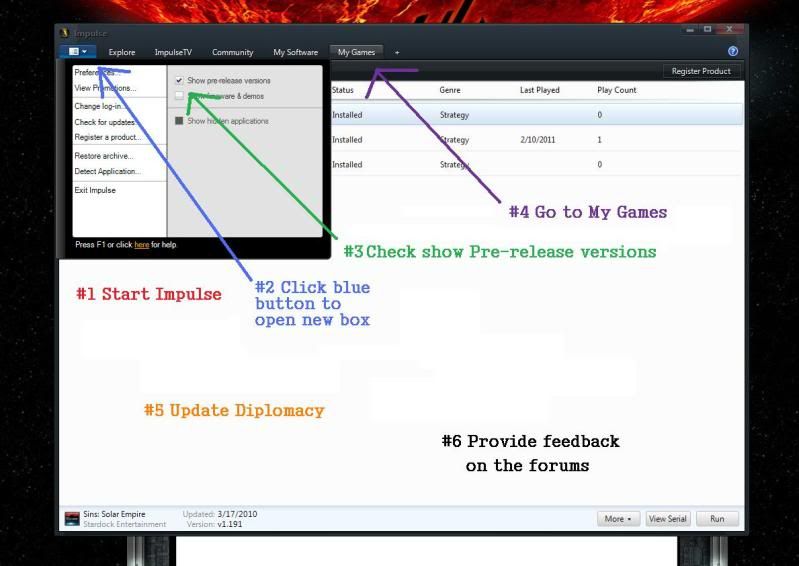
I made this picture for Yarlen.

Upgrade proceedure


Quoting therealjcool, reply 4161
Hm... I'd love to try the latest version, but I bet if I update I'll effectively kill all the other mods

So I'll hold off for now... keep up the great work guys

 
End of therealjcool's quote

Funny thing is that upgrading to the beta patch does not break any diplomacy mod that you carry over.  So you can if you want to.

Edit:  I was also informed that reverting back if you don't like the Beta is as simple as unchecking that show beta and prereleases box and updating Sins again, which actually undoes the beta patch.

Haven't tried it myself, but it's nice to know your options.

Reply #4166 Top

Hey Stant, maybe i'm a bit simple up in the noggin but the fix didn't work for me? I installed it, extracted, replaced all the existing textures with the new one in my mod folder, and then nothing? :S Not too sure what else I can do... Halp?

Reply #4167 Top

I believe a lot of the planet textures are fixed in the beta--might want to check the files in there.

Reply #4168 Top

must be the .mesh files then


Reply #4169 Top

Quoting chanter45, reply 4166
Hey Stant, maybe i'm a bit simple up in the noggin but the fix didn't work for me? I installed it, extracted, replaced all the existing textures with the new one in my mod folder, and then nothing? Not too sure what else I can do... Halp?
End of chanter45's quote

-snip-


Holy crap.  myfits0's avatar blinks...  Never noticed that before.


Edit:

I know what's wrong.  It did work, but only half way.  Planet textures are like the force, if you are up on your Star Wars metaphors...  They have a light side and a dark side.  I only gave you half of the textures.  On my end, I had it all fixed up, when it came time to pull the files back out, I only grabbed the light side, and that's why they still look funky.  Your lights and darks don't match up currently.  So this new pair of downloads will fix that.

Get both of these...  Instructions are the same as before.  Texture folder, overwrite.

http://sites.google.com/site/steelers086/gamefiles/TextureFixA.rar

http://sites.google.com/site/steelers086/gamefiles/TextureFixB.rar


If anyone else downloaded my earlier posted fix, you'll need these ones instead.  Sorry.

Reply #4170 Top

Thanks, at my buddies but i'll try it out. Thank you so much man!

Reply #4171 Top

thank u m8, it´s working.

just another question.... after i was downloading the lastest version i recognized that the dynamic movement mod is not there anymore. is there a way to use it with version 0.99 for diplomacy?


greets

dennis

Reply #4172 Top

Yes, run it as a mod on top of v0.99 just like you would for the entrenchment version of DS, however, it's outdated, so I wouldn't unless you're desperate to have it.

Reply #4173 Top

doesn't seem like you guys have been all that active since... two years ago... in terms of new features. I want more stuff!

Reply #4174 Top

Yeeeeeaaaaaaaaah............   I'm gonna let that one slide.

There's a reason why not a whole lot of stuff has been added in that time (actually a lot of things got added last year around this time), and that's because this mod was making Sins smack head first into the 2gig RAM limit placed on 32bit executable programs.

Now that this new Beta for Diplomacy has been released to us, that doesn't appear to be much of an issue anymore, so once this Beta business is completed and an official patch is released, you'll see more stuff being added to pretty much every currently being developed mod for diplomacy out there.  If you have the beta patch and the DS Diplo 0.99 you'll see a couple new things like new player portraits and a space telescope...

Reply #4175 Top

Haha poor guys, you want to add more content but you cant at the moment!

Anyways Stant thank you very much for the fix, my planets look all awesome again.

Keep up the awesome work, i'll be following.