Island Dog Island Dog

What Are Your Current Impressions of Windows 7?

What Are Your Current Impressions of Windows 7?

So it’s been many months since Windows 7 was released to the public, and during my travels on the web, I have seen praise from so many people about how they are enjoying Windows 7.  Some of these are even coming from Mac users which really should tell you something.

My experience has exceeded my initial expectations, and I enjoy using Windows 7 every single day.  Performance has been outstanding on my main rig, which is obviously quite powerful, but I can say the same thing for my Acer Netbook which I also have Win7 installed on. 

win7

Obviously I run quite a few games and applications, and haven’t had one single issue with one, including older applications.  On the customization side, having apps like Fences, ObjectDock, and WindowBlinds make the desktop experience that much better – especially in terms of organization.

Now that many of you have had quite a bit of time to use Windows 7, what are your current impressions so far?

264,951 views 102 replies
Reply #26 Top
It runs really well - even in 64 bit so I give full credit to Microsoft. I have an old scanner where the last driver released was for 32 bit XP - and it does not work under Win 7 64 bit...bit I just load up Windows XP mode, and voila! It is working again!
Reply #27 Top

I tried the beta and really liked it. Even my older TV card worked with it in Media Center.

My nephew will be building a new system soon, and he offered to buy me a copy of W7 when he upgraded. So I'll soon see how I like it on a more permanent basis.

Reply #28 Top

Quoting Lantec, reply 11


think it is the best Windows there ever was
I have to agree.

Starting with the release candidate I've seen 0 BSODs

My only complaints.....

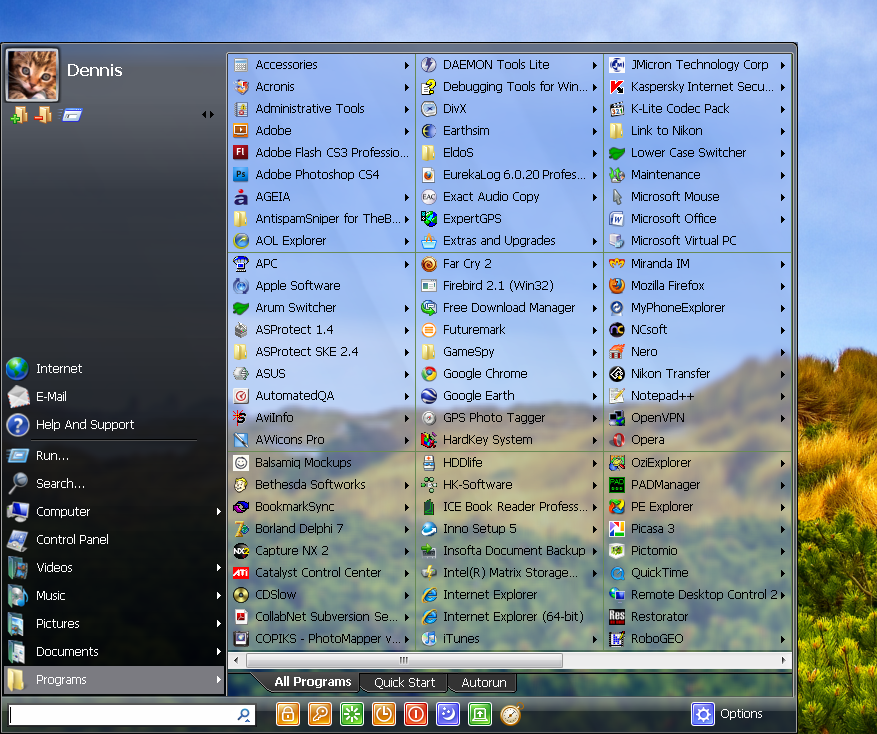
I prefer the XP Start Menu's "More Programs" ......I can see everything in a glance...........

The other issue is with 16 bit app support. I've still got a couple I need to use from time to time. I installed VMLite to run them in XP Mode.
End of Lantec's quote


Totally agree with you on the start menu in w7,just as luck would have it infopackets email had this in it's software section today,haven't tried it yet tho i will get around to it eventually,the pro version is the one that has tabs at it's base of the shot i think

http://www.startmenu.7.com/replaces startmenu,no hacking of registry


Reply #29 Top
I really like Win7. Although Vista ran well for me, 7 just continues it plus improved on some things. Someone mentioned they disliked Windows Media Player, big deal so don't use it. I dislike it for many reasons but that isn't a reason to hate Win7. I have found myself though using my Linux partition more exclusively now than Windows. I guess I needed a change of scenery for now that even Stardock products can only go so far towards providing. Still Win7 is a touchdown for MS IMHO.
Reply #30 Top

I love Windows 7.  I've "been out there" a loong time and I've used every windows version except 2000.  The worst, by far, was ME.  The best by far is Windows 7.  I spend a lot less time under the hood since I updgraded from Vista.  If Windows 7 seems buggy or runs poorly, try using Eusing registry cleaner.  Chances are the registry is crapped up and needs to be cleaned out. When I first upgraded to Vista, it was buggy - lots of those blue screens we all love (NOT!).  I used a well known registry cleaner but my system was still slow.  Finally I ran Eusing and my computer ran like new again and Vista was much better.  I still spent more time than I liked under the hood always having tweak something.  With Windows 7 I've been happy not having to tweak it all the time.  It runs the way it should and the day will come when people won't want to upgrade to Windows 8 because they're so happy with this version.  It is not just another service pack for Vista.  There are some major differences internally. 

Fair Warning:  ALWAYS BACKUP THE REGISTRY BEFORE MESSING WITH IT!!  You can set Eusing to create a restore point automatically.  I always back up the registry and create a restore point.  So far, I have never had a problem with Eusing.  It is very powerful and I do not recommend it for a novice who is not familiar with the windows registry.  A safer but less powerful choice is Ccleaner's Registry cleaner.  Both are free programs.  I usually use Ccleaner and only use Eusing when I really need to. 


Reply #31 Top

definitely love win 7.. win me was my fav before that.. I didn't like XP and I think most people didnt but now say they like it just because vista was so much worse it made xp look decent.

Reply #32 Top

Quoting SwerydAss, reply 31
definitely love win 7.. win me was my fav before that.. I didn't like XP and I think most people didnt but now say they like it just because vista was so much worse it made xp look decent.
End of SwerydAss's quote

What?  You liked Windows ME?  No way.  Back when I had that junk OS, literally not a day went by without me getting a BSoD for some stupid reason, like ME not appreciating sound or video drivers, etc.  I heard that even Bill Gates admitted that ME was Microsoft's worst OS ever.  It didn't even need my help to crash itself.


As for Windows 7, though, it's fantastic.  I never want to see XP again.  I love the new taskbar system, with the window previews and auto-grouped programs - it's clean and seriously easy to use, plus I can look at another window without actually opening it.

I also really like how the start menu keeps track of recent files within the individual programs that open those files (i.e. MS Word keeps a list of recent *.docx files opened).  It's a huge improvement over the original Recent Documents folder, which I never used.

I love how I can hide system tray icons.  That particular feature has been needed for a decade now.

I love how I can actually turn off UAC.  Unlike some people, I know what I'm doing and don't need to confirm it 3 different times.

I love how Windows 7 handles network services and wireless networks.  On XP, you had to create a network before adding a wireless connection, and if you named that connection incorrectly, your wireless peripherals (printer, NAS drive, whatever) wouldn't work.  Windows 7 sets up the network automatically as soon as you get internet access through your network's router, which probably saved me a huge headache.

The OS is also very responsive, and doesn't seem to get bogged down by its own system processes after a few days of not being restarted.  I admit though that I still don't like how in both Vista and 7 that Ctrl+Alt+Delete doesn't just immediately open the Task Manager.  While I've not yet seen it in Windows 7, Vista had an issue with occasionally failing to open that dialog box, which of course made it impossible to get the Task Manager open.


So yeah, I like 7.

Reply #33 Top

I admit though that I still don't like how in both Vista and 7 that Ctrl+Alt+Delete doesn't just immediately open the Task Manager.
End of quote

Ctrl+Shift+Esc

Reply #34 Top

Quoting Jafo, reply 33

I admit though that I still don't like how in both Vista and 7 that Ctrl+Alt+Delete doesn't just immediately open the Task Manager.
Ctrl+Shift+Esc
End of Jafo's quote


Or right click the taskbar and "Start Task Manager" if mouse is already in hand.''


And to throw my 0.02 on the topic; best Windows version by far!

Reply #35 Top

W7:-

Crappy start menu, same as Vista

Blue screens when I put my card reader in

Doggedly refuses to let me set my own file permissions

From time to time I have to reset my WB folder to share (W7 randomly changes it back) otherwise it won't change skins without a reboot

I have my e-mail icon set to show in the tray - W7 randomly sets it to hide

Things like the start menu and explorer need serious third party modifications to make them usable


I use W7 because Vista is worse and XP won't let me use more than 2Gb RAM

Reply #36 Top

I was one of those that stuck with XP as long as I thought it viable. Had it from a few months after it came out up to a month or so ago. Had it perfectly stable and suited to me. More importantly all my games, whether designed for Win3.1 up to DX10 only worked on it.(a little trickery for DX10 :) )

Win7 brings some fresh air with it and I have very few complaints. My biggest gripe of course being some older games that won't work and may never work right on it. For instance, I have to use the chaoslauncher to get Starcraft to play in a window, otherwise it will lock the entire PC within 45min. Plays fine but slightly annoying being stuck in an unresizable window.

The Start menu I doubt I'll ever fully get used to or like. Good thing with OD+ and Impulse Dock I rarely have to actually use it. If worse comes to pass I'll just grab that proggy someone posted around here to revert it back to XPs style. Much more usable to me that way.

Other than those, it's been stable and I enjoy being able to take advantage of my DX10 GPU and RAM now. Still glad I skipped the beta,..err Vista for Win7 ;)

Reply #37 Top

Still glad I skipped the beta,..err Vista
End of quote

The RC of Vista was a dead loss for me.....it couldn't recognize my modem...so I couldn't get online to update it and force the dog to work.

I now have it in VMWare....and it's little more than Win 7's idiot half-brother - you know, the one that's locked in the attic....and the family only refers to as 'it'.

Reply #38 Top

Ctrl+Alt+Esc
End of quote

Does nothing for me.  :annoyed:

Reply #39 Top

I use W7 because Vista is worse and XP won't let me use more than 2Gb RAM
End of quote

If you were using the 64 bit version of XP it should let you use more than 2 GB of memory.


Reply #40 Top

I have Windows 7 and XP on my laptop. I have Windows 7 and Vista on my main PC. I like 7 hands down over both Vista and XP!

It loads faster, it seems more stable, and it has a lot of cool things like jumplists, taskbar on steroids, slideshow wallpapers, etc.

Reply #41 Top

Quoting kona0197, reply 39

I use W7 because Vista is worse and XP won't let me use more than 2Gb RAM
If you were using the 64 bit version of XP it should let you use more than 2 GB of memory.

 
End of kona0197's quote

I was running 3gb on XP 32bit.

Reply #42 Top

Does nothing for me.
End of quote

Ctrl+Shift+Esc
End of quote

Reply #43 Top

If you were using the 64 bit version of XP it should let you use more than 2 GB of memory.
End of quote

Good luck finding programs which will run on 64 bit XP ;)

Reply #44 Top

Oh, and another annoying thing -

Much like Vista, W7 turns off drives not in use. But unlike Vista I haven't found a way to stop it doing it yet.

This means when I try to start a game (installed on a separate drive) I get a blank menu for 5+ seconds until the drive wakes up. Very annoying >:(

Reply #45 Top

Fuzzy, could that be simply a power management setting?


Reply #46 Top

well as a die hard vista fan i have to admit i am smitten by windows7, apart from all those annoying folders in documents  lol

Reply #47 Top

I hate the way windows 7 does not remember the positions of explorer windows, duel screen I like to open my documents folder and have them appear where I left them and then open my pictures folder and have them appear where I left them the last time I closed them. fortunately a great utility called ShellFolderFix saved the day, now I love windows 7.

Reply #49 Top

It's ok, but  I still prefer XP , :grin:

Reply #50 Top

Good luck finding programs which will run on 64 bit XP
End of quote
  did try this for a while and yes there is no support for this. even from microsoft.

Blue screens when I put my card reader in
End of quote

sounds like a bios problem.  Or dying PSU

Back when I had that junk OS, literally not a day went by without me getting a BSoD for some stupid reason,
End of quote
  never had a bsod.  I guess I'm the lucky one... And I like the old start menu and folder view.