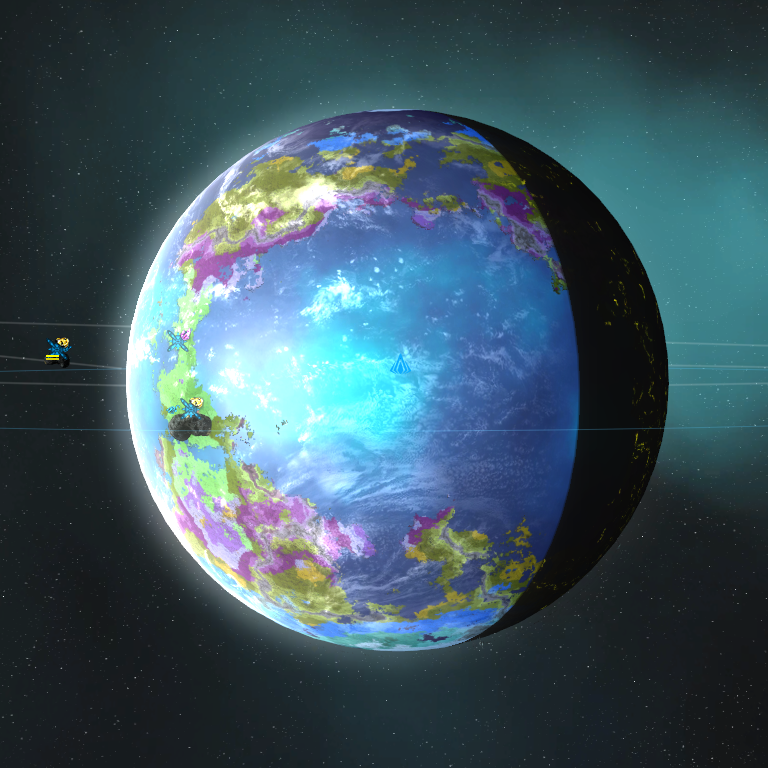
Novus Universum 2.0

Greetings! Since this is a new year I will start working on a new and improved version of all my planets. Or more accurately I will be scrapping all the textures and redoing them from scratch. In the intent of large and long games I will be bumping down the size of the textures back to rebellion standard of 2k/1k. This will allow me to make many, many more planets than before. I will also be rebalancing them as there will be many many more types.


Now for questions I asked:


Why 4k textures?

I used 4k texture cause I wanted planets to be, well, beautiful. But that comes with a trade off, thay are 5mb each. Around 10mb per planet type. And that is just color. I never included a shine or bump map. I decided to slash the texture size down to 2k to allow for more planet types. As a 4k set would be around 20mb a 2k set would be 5mb which is the difference between 10 and 40 planet types for 200mb.


Will there be moons and double planets this time?

Yes. I planet to build a massive catalog of moon types and planet types. And lots of combinations each will.be slightly different. They will be released with each planet type.


So 40 planet types this time?

Actually no. There will.be more. My mod was around 280mb last time. So 60 types are not out of the question. And keep in mind that is the low end. I am not sure how the engine uses bumpmaps but I will find out. Some planets won't have any shine to them and will use a single tiny black texture. That will cut into the size. Certain planets may reuse textures. Or lack a texture according to the look I want.


Last time your planets looked.like shiny marbles.

Yes, that was my fault. I wanted to shut that off and I didn't know a lot about the way the engine does shine. Thus I had no texture and it defaulted to a pure white. Giving the planet a massive shine all over so it looked buffed. That won't happen again.


Last time your planets looked odd at the poles.

Yes, again my fault. I used satellite textures which I modded. This I thought would make for better planet textures. They didn't quite live up.to my expectations. As well as the engine not doing spheremaps correctly which is fixed in rebellion and the planet dlc.

So you are going to do proper planet texture this time?

Yes. I have a program that creates excellent planet maps, Fractal Terrains, which I have been playing and learning with for the past few years. I also know a lot more about planetology, climatology, and astronomy. Thus I can now create good planet maps of every type.


So estimated amount of planet types when done?

40-60 base types, 7 size types, around 250 single planet bases, literal hundreds if not thousands of moon, multiple planet configurations.


All in all, a planet mod where you literally may not run into the same planet twice in a few games. Moons will affect how a planet operates.


24,216 views 26 replies
Reply #1 Top

My my, look at who came back from the dead! We have much to talk about, and I also happen to have much of Novus Universum in a Rebellion-ready state; admittedly I was working on getting a Rebellion-capable version of it out due to other factors. These might be helpful for you.

Reply #2 Top

Thanks I lost most of my stuff in a drive wipe a few days back. I had to take a look at the pipeline files from SOGE to remember what I did with them. It has been forever. I actually wonder what to do with the shine. I can squish the textures down to 1mb each. so each planet type would be 2mb so I can fit 100 unique planet textures in easily.


To be honest the shine drives me nuts cause it inflates the texture size and is completely unrealistic. Any actual glare that strong would blind satellites and planes and appear in every planet picture. But what we see is it is a rare thing. I think I should just remove it. Or figure out how to rebuild the effects file so it takes a different texture.


I don't think i can make planets have a bump map. but I got a program that puts a bump look on the planet texture itself.

Reply #3 Top

Haha!!!! Success! I figured out how to make the spectral shine take a black and white independent texture! This, is, huge! This is partly why I gave up so long ago. And I guess time helped out. But! What this means is that I have complete control over a planet shine! I can decide what has a shine and what doesn't. It removes the problem of extra shine everywhere.

Also and this is the biggest part: MOONS CAN HAVE SHINE NOW!!! (Or no shine if I desire.)

Twin planets? Check.

Talus and Tralus? Check.

Onderon and dxun? Check.

Complete jovian.moon systems? Check.

Yavin? Check.

And, no shiny moons!

It also allowes me to reuse shine textures on the same base planet. Keeps the main texture down to ONE MB with no quality loss over vanilla since there is no alpha, a savings of 75% I think cause dx1 compression kills alpha.

And with Fractal Terrians I can churn out planet images once I get all the inputs set up. Things are looking good. Stay tuned for more information, images, and tons of goodies! I fully expect to run out of planet types to make before running out of space or ram or lag.

Reply #4 Top

Important update, I got clouds to render off the mesh. As well as get there color from the mesh. It is really important cause clouds were given to a planet through the planet data files. Now they are not and will render for objects not a planet.  Dual planets are gonna look even.better now.


The only two textures that I haven't changed yet are the ring and corona/air glow ones. Which are still done through the data files and will not render for moons, and dual planets. The corona has a seperate render file which to.make it work I will need to somehow merge it with the main planet file.


Sizes:

Light side: 1Mb

Night side: 1mb

Shine: 1mb

Clouds: 1mb


I am replacing ironclad's planetary reality with my own.


Edit: Added a screen cap on my current test planet. Colors are all weird from still using my Biome map as a base. I killed the planet glow. will work on making it come back.

Current Test Planet

Reply #5 Top

You can get a bump map if you define the planet as an asteroid. That will give it the Asteroid shader and not ShadowedAsteroid which the moons use; this is easily fixed and has been on SoGE's end.

I'd also recommend against DXT1... It really hurts quality; probably better off going with DXT5 with smaller dimensions. That reminds me, I forgot to send you the PipelineEffects SoGE uses right now; we got a bunch from STA3 and I think one or two from Stars.

Reply #6 Top

I honestly cannot see a difference between DX1, DX3, and DX5. They all look the same. That pic above is a DX1 texture.

Reply #7 Top

Fair enough, I believe I've seen some non-alpha channel textures benefit from DXT5 over 1 but I digress.

An important note; the storm/cloud particles need a do over. They're fairly resource hogging, and a few of them are tossing out an error in dev exe. I'll try and see if I can get someone to redo them, or even make them from scratch myself. Also, what is your Steam username, if I may ask?

Reply #8 Top

novacameron

And ya I'll redo the particles to. I am slowly trying to thread the bump maps in. I dunno what is all required but I'll get there.


Edit: Or might not... I dunno my textures have a nice bumpmap built in and it isn't like you can see much shadowing and large scale shadowing in high orbit. Haven't yet figured out how to merge the corona into the main planet file. It isn't quite as necessary as the shine was. 

Reply #9 Top

Play around with the planetCoronaColorMultiplier in PostProcessingData perhaps?

Reply #10 Top

Nah, it isn't that it has no color. It just isn't reading the way I want it to. It either isn't pulling the texture off the mesh or it isn't reading the color off the mesh. My guess is the color. But it could also be that it doesn't know how big to make the texture. 


I actually think it is impossible to create a corona off a mesh because it is screen texture and not a model texture. Thus the game doesn't know what to.do with a mesh texture that is being told to render like a screen texture.

It also isnt realistic as the only way to see any type of airglow in orbit is to be right against the planet. Like closer we can get even in game. Father than that it just appears flat. The specular texture works wonders and actually gives off a slight airglow. If I can isolate how it does that and expland it... Ahh it might be the bloom doing that. I should play around with the boom and see if I can get it to be a replacement for the "corona". And planets don't have coronas in reality... 


At least I can get orbitals to shine and clouds now. In theory. I need to test it.out. Which I should do today. The problem is to get borh planet and asteroid fx to render the exact same things.

Reply #11 Top

You can edit their PipelineEffects files to do that. Also, the CL texture for planets do have a specular channel; it's the alpha channel that DXT1 throws out.

Reply #12 Top

I really hate editing alphas. So I toss them. I am hijacking the bloom settings to serve as my glow for my planets. An added benefit is that there is now a nice gradient of light, so the edges of the light side are in twilight and the center is bright.

Reply #13 Top

A new screen cap of the test planet. I think it is looking pretty good.

Reply #14 Top

Major Breakthrough!

I got night clouds rendering. As well as night atmosphere via the bloom. Take a look.

So pretty...

Reply #15 Top

o.0 I like whats happening here.

Reply #16 Top

Quoting mikefacciola, reply 15

o.0 I like whats happening here.
End of mikefacciola's quote

Yay! A response! I am glad you like it so far. I just tweaking the effects files till I get a look I like first. And updating and expanding it. I am trying to get a planet done so I can ask for tweaks. Bloom is being problematic but I think it has great potential at the cost of few resources.

Reply #17 Top

More improvements. I fixed the bloom finally. l over did something completely different that was affecting it. I added slight texture coloring based on lighting, I fixed the night side clouds, I switched the night side land texture to the specular texture which is BW (and not bloody color like the way it was) and only shows seas faintly and ice a little better and added an effect that would make it flicker somewhat, I added an effect that would make the night side city lights twinkle, I added an effect that would make the specular light on the light side flicker, I linked all textures and colors through the model so the only textures will be pulled from it making moons and jovian systems easy to do, I linked the bloom to the model color alphas making it possible to give each planet and asteroid their own bloom/atmosphere combination, the bloom has six channels: three for each side, skybox and planet color effect bloom now, skybox lighting effects texture color a little more. Showcase close up:

Reply #18 Top

Good progress! A very nice change from that 100% black dark side.

Reply #19 Top

Quoting Lavo_2, reply 18

Good progress! A very nice change from that 100% black dark side.
End of Lavo_2's quote

Agreed

Reply #20 Top

Quoting Lavo_2, reply 18

Good progress! A very nice change from that 100% black dark side.
End of Lavo_2's quote


It will still be possible to get black night sides. But only on planets I designate, like airless moons and planets. Bloom isn't this slap  the same bloom on everything anymore but a complex equation that takes in around a dozen inputs to get.

Reply #21 Top

Oops... Well I found out that each render level has a max of 64 variables. I had to tell it to render the day and night sides separately.

Reply #22 Top

Successfully split rendering of day and night sides. I tried something with the bloom and broke it though. Bloom needs more tweaking.

Reply #23 Top

Wow, incredible work...would love to learn how you are making all that magic happen.

Looking forward to seeing more of your beautiful planets.


DANMAN

Reply #24 Top

Quoting DANMAN3712, reply 23

Wow, incredible work...would love to learn how you are making all that magic happen.

Looking forward to seeing more of your beautiful planets.


DANMAN
End of DANMAN3712's quote

I actually don't know really. I just know how the data flows through the fx files. So I am adding and rerouting it. Lots of copy pastes. Tweak there. Edit here. There are lots of actions that I don't know what they do or mean. I wish I did.

Aaaaaand I broke my planet and bloom settings again.... dang it...

Reply #25 Top

I have been thinking and this mod may actually turn into a graphic make overhaul and upgrade as well as planets. Cause I actually like messing with the FX files. I need to learn some OpenGL/DirectX coding but it should be fun. I haven't started the data files for the planets yet and will start soon.