

Exclude folders from Recent Items
Prior to Windows 11, the Recent Items list included only files. In Windows 11, the list also includes folders, which dramatically reduces the usefulness of the list. Is there a way to exclude folders from the list?

Hello,
Sorry to hear you are having issues. Not sure if that is possible. However, I have forwarded your problem/question to Stardock Support Team for their assistance. Please keep an eye on this thread for any updates. We appreciate your feedback and patience. Thank you.
Basj,
Stardock Community Assistant
Hello,
I have forwarded your problem/question again to Stardock Support Team for their assistance. Please keep an eye on this thread for any updates. We appreciate your feedback and patience. Thank you.
Basj,
Stardock Community Assistant
Hi billyandrewsv8mbg, thanks for the post. Sorry for the late reply.
Prior to Windows 11, the Recent Items list included only files. In Windows 11, the list also includes folders, which dramatically reduces the usefulness of the list. Is there a way to exclude folders from the list?
Yes, for Windows 11 styles, check "Configure menu" for from the Start Menu tab of the app.
From there -> Advanced options, should be an option" "Hide folders from recent documents list".
This, and other options can be found in our Start11 v2 UI guide:
https://support.stardock.com/space/SHC/1995309123/Start11+v2+UI:+Windows+11+Style#Advanced-options
Best regards,
Adam McGuinness
Stardock Support Specialist
I'm using Windows 7 style, not Windows 11 style. Under Start Menu -> Configuration for this style, there is no Advanced options. Is there a way to fix this problem in Windows 7 style?
To clarify, can you show us what/where you're seeing the recent items list? A screenshot image would help to be sure.
Best regards,
Adam McGuinness
Stardock Support Specialist
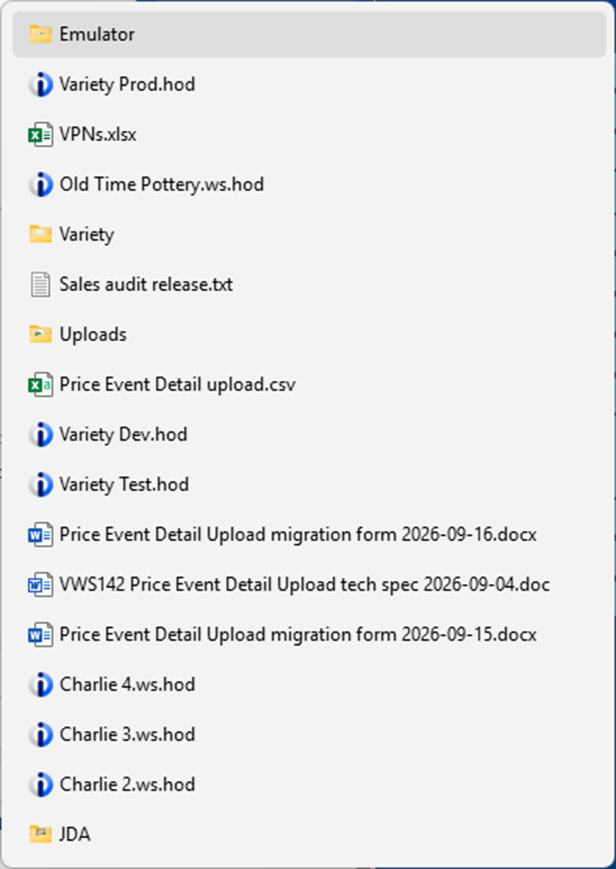
In the following sample, "Emulator", "Variety", "Uploads", and "JDA" are all folders. Often half the list consists of folders.
Regarding what/where I'm seeing the recent items list, click the Start menu, then Recent Items.

Thanks for clarifying. I can see this is the Recent Items on your Shortcuts list. The shortcuts there come from this path, which is the same for the Windows 11 style:
C:\Users\USERNAME\AppData\Roaming\Microsoft\Windows\Recent
When testing this further with Start11v2, I've come across an interesting quirk that may be a good workaround for you.
Try switching to Windows 11 style, change the advanced option "Hide folders from recent documents list" to On. Then switch back to your normal Windows 7 style. Are the folders hidden now? This occurred for me, and I'll have that noted.
Best regards,
Adam McGuinness
Stardock Support Specialist
Welcome Guest! Please take the time to register with us.
Select a reason for giving karma:
You're about to visit an external site:
Sign up here to get the latest news, updates, and special offers delivered directly to your inbox.