
Wallpapers
Vampothika
from  Stardock Forums
Stardock Forums
I can't find your wallpapers.


So if the description of a style in WindowBlinds 11 states that the wallpaper or wallpapers is/are included in the download, the description is really for WinCustomize users, rather than just WindowBlinds 11, meaning it's assuming you're downloading the zip from the site instead of in WindowBlinds 11?
The description is written by the skin designer, so it reflects how they choose to present and package their work. It isn’t something controlled by WindowBlinds 11 itself.
WindowBlinds only requires the .wba file to function. However, many designers like to include extra wallpapers in formats such as JPG, sometimes in multiple sizes or variations. In those cases, they’ll bundle everything together in a .zip file along with the .wba.
On WinCustomize, for Windowblinds, the site only accepts uploads in .wba or .zip format, so designers decide which option best fits their work.
Thank you,
Basj,
Stardock Community Assistant
Hi there,
Sorry you’re having trouble. The quickest way to get help is to DM/PM/Email the wallpaper’s creator directly with your question.
Thank you,
Basj,
Stardock Community Assistant.

He's a 'she' ... 
Most of vampothika's wallpapers to match her wb's are included in the zip-file when you download from the windowblinds gallery.
When downloading more styles from within WindowBlinds 11, most of them say that the wallpapers are included in the download, which I'm sure they are, but the wallpapers don't appear in the list of wallpapers in WindowBlinds 11 with all of the default wallpaper locations selected.
I remember this from a long time ago and it still seems to be a problem.
I don't think it's the style creator's fault or responsibility that their wallpapers aren't showing up and to somehow fix the problem themselves.
This is obviously something that should be fixed in WindowBlinds 11 in my humble opinion, so that style creator's wallpapers are included without the user having to go to the website and download the zip file, just to extract the wallpaper.
For example, I've just downloaded and applied Amiga by LightStar (who is excellent) and although the wallpaper may well be included in the download as it says in the description, the wallpaper doesn't appear when applying the style and isn't available to apply in the list of wallpapers after the download.
I'm just wondering though, if the wallpaper has actually been downloaded, is there a path I need to add to the list of wallpaper locations, along with the default locations?
For the time being I had to come to this site and manually download the zip file to then extract the JPG and set it as my wallpaper in Windows 11 personalization settings.
When downloading more styles from within WindowBlinds 11, most of them say that the wallpapers are included in the download, which I'm sure they are, but the wallpapers don't appear in the list of wallpapers in WindowBlinds 11 with all of the default wallpaper locations selected.
I remember this from a long time ago and it still seems to be a problem.
I don't think it's the style creator's fault or responsibility that their wallpapers aren't showing up and to somehow fix the problem themselves.
This is obviously something that should be fixed in WindowBlinds 11 in my humble opinion, so that style creator's wallpapers are included without the user having to go to the website and download the zip file, just to extract the wallpaper.
Hello,
Sorry to hear you’re experiencing issues. Based on what I know and if I remembered it correctly, if the wallpaper was properly included in the skin and correctly set in SkinStudio, it should appear under the Wallpaper section in the WindowBlinds 11 configuration.
However, some WindowBlinds designers prefer to package their wallpapers separately in a ZIP file, often with multiple versions included. In those cases, the wallpapers aren’t directly tied to the skin itself, and the user needs to choose which version they’d like to apply.
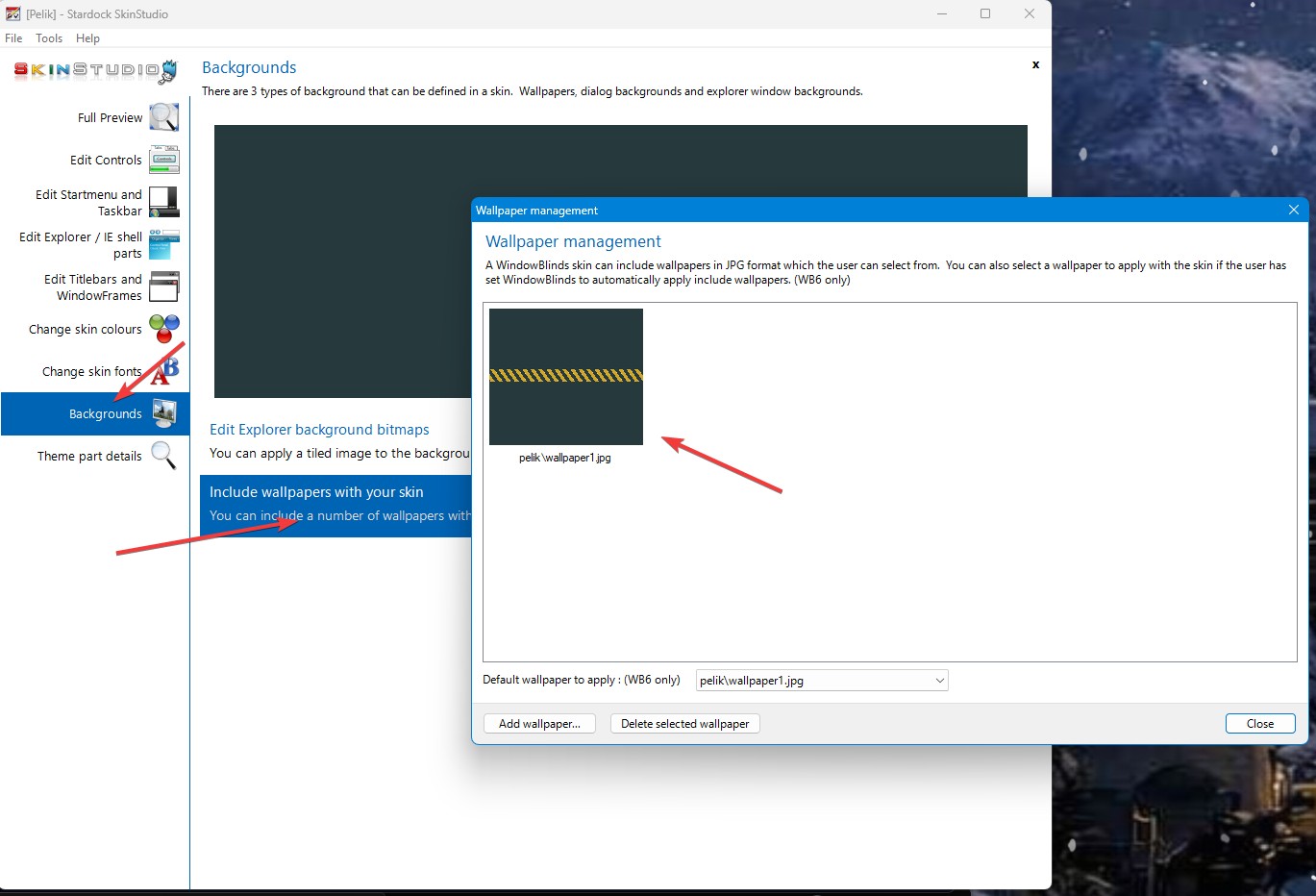
Thank you,
Basj,
Stardock Community Assistant.
Hello,
Sorry to hear you’re experiencing issues. Based on what I know and if I remembered it correctly, if the wallpaper was properly included in the skin and correctly set in SkinStudio, it should appear under the Wallpaper section in the WindowBlinds 11 configuration.
However, some WindowBlinds designers prefer to package their wallpapers separately in a ZIP file, often with multiple versions included. In those cases, the wallpapers aren’t directly tied to the skin itself, and the user needs to choose which version they’d like to apply.
Thank you,
Basj,
Stardock Community Assistant.
Thanks for the reply Basj.
So if the description of a style in WindowBlinds 11 states that the wallpaper or wallpapers is/are included in the download, the description is really for WinCustomize users, rather than just WindowBlinds 11, meaning it's assuming you're downloading the zip from the site instead of in WindowBlinds 11?
So if the description of a style in WindowBlinds 11 states that the wallpaper or wallpapers is/are included in the download, the description is really for WinCustomize users, rather than just WindowBlinds 11, meaning it's assuming you're downloading the zip from the site instead of in WindowBlinds 11?
The description is written by the skin designer, so it reflects how they choose to present and package their work. It isn’t something controlled by WindowBlinds 11 itself.
WindowBlinds only requires the .wba file to function. However, many designers like to include extra wallpapers in formats such as JPG, sometimes in multiple sizes or variations. In those cases, they’ll bundle everything together in a .zip file along with the .wba.
On WinCustomize, for Windowblinds, the site only accepts uploads in .wba or .zip format, so designers decide which option best fits their work.
Thank you,
Basj,
Stardock Community Assistant
Welcome Guest! Please take the time to register with us.
Select a reason for giving karma:
You're about to visit an external site:
Sign up here to get the latest news, updates, and special offers delivered directly to your inbox.
 WinCustomize Forums