Will Start11v2 be Compatible with the New Windows Taskbar?

Will the enhanced taskbar still provide the same features?

I'm curious if Stardock has been testing Start11v2 with the new taskbar features (available in the Windows 26220.9022 Beta version now) for moving and resizing the taskbar. This feature will most likely be included for everyone in the 26H2 release of Windows in September or October of this year.

I really like the Start11v2 Enhanced taskbar features, especially the taskbar button appearance settings, and would hate to lose them when 26H2 drops.

Has anyone running 26220.9022 and using Start11v2 experienced any issues?

1,244 views 7 replies
Reply #1 Top

For now leave the OS as taskbar at the bottom and left Start11 decide on locations.

Reply #2 Top

Thanks for your reply. I am relieved that my taskbar customization with Start11v2 will continue to work. :grin: 

Reply #3 Top

Is this still the current guidance, don't use the new OS taskbar options..?


Reply #4 Top
Quoting KwisatzCA, reply 4145857

Is this still the current guidance, don't use the new OS taskbar options..?

End of KwisatzCA's quote

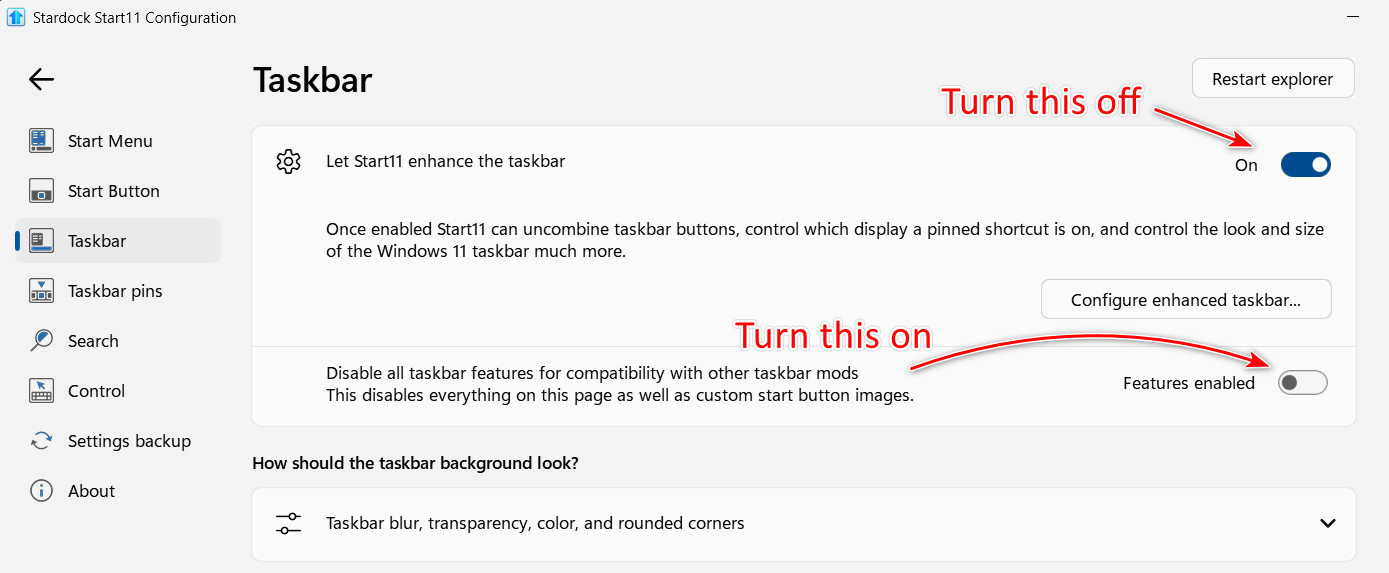
If you want to use the Start11 Enhanced taskbar, you need to leave the OS taskbar setting at the bottom. If you disable the Enhanced taskbar and turn on the "Disable Taskbar features..." you can use the OS to change the position of the taskbar while still using the Satrt11, Start menu. I've tried it and it's really not that great compared to Start11.

P.S. Cool avatar!

Reply #5 Top

Yeah, playing around I stumbled on those combinations as well... the one nitpick I have about the Start11 implementation is that when paired with fences and docking the groups with roll-up to the bottom, with the OS version the taskbar boots right into the position I want (left) and the groups stay aligned to the bottom edge... With the Start11 version, the system boots and the taskbar is momentarily at the bottom before moving to the left, but then this bumps all my fences up by the height of the taskbar, and they stay there floating above the bottom...

Reply #6 Top

We should have the beta update of Start11 with support for those new OS settings this week.

+2 Loading…
Reply #7 Top
Quoting KwisatzCA, reply 4145859

Yeah, playing around I stumbled on those combinations as well... the one nitpick I have about the Start11 implementation is that when paired with fences and docking the groups with roll-up to the bottom, with the OS version the taskbar boots right into the position I want (left) and the groups stay aligned to the bottom edge... With the Start11 version, the system boots and the taskbar is momentarily at the bottom before moving to the left, but then this bumps all my fences up by the height of the taskbar, and they stay there floating above the bottom...

End of KwisatzCA's quote

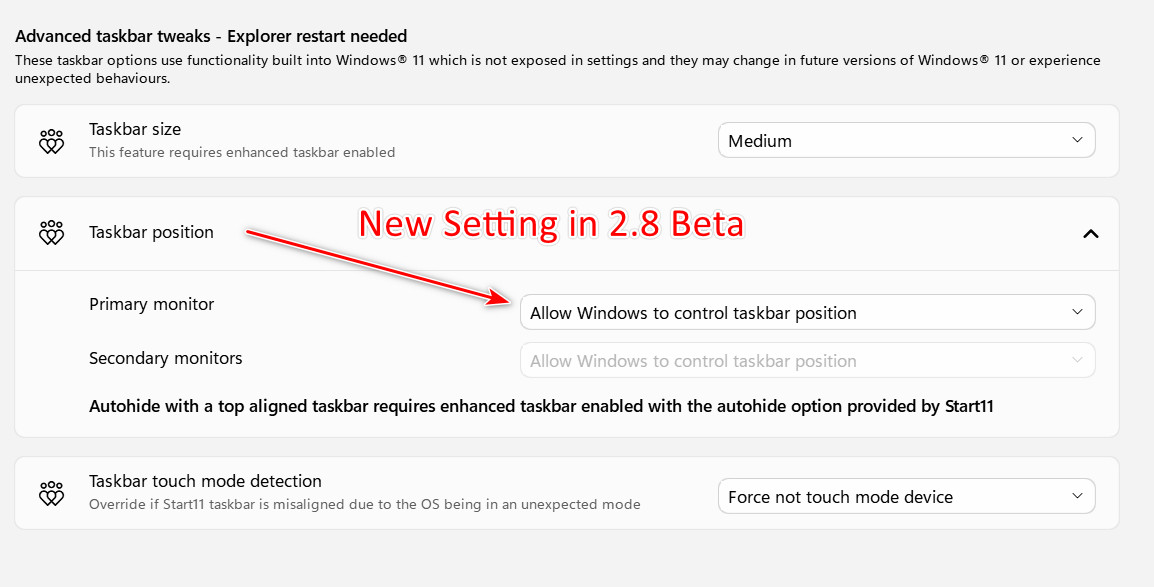
The new 2.8 Beta allows the taskbar position to be controlled by Windows, and it works with the Enhanced taskbar enabled.