
Failed to alloc memory
Installing Fails
from  Stardock Forums
Stardock Forums
Clicking install from Object Desktop stops with
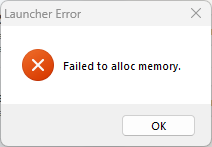
Problem Code: 54




Installing Fails
Stardock Forums
Clicking install from Object Desktop stops with
Problem Code: 54
Stardock Forums
Top
Hello,
Sorry to hear you are having issues. If you download the installer directly from your account and install it, does the same issue appear?
https://store.stardock.com/myaccount/products
Thank you,
Basj,
Stardock Community Assistant.
Stardock Forums
Top
Download was yesterday not possible, it always stopped. But in the recent past seconds it worked. It could be installed and started without any error messages. Looks like a problem of the Object Desktop client.
 Stardock Forums
Top
Stardock Forums
Top
Hello,
Thanks for the update. Since the direct download works, the issue is likely that the Object Desktop Manager can’t reach our update server. This can happen when certain internet providers get temporarily blocked by our security system during periods of heavy traffic or bot activity.
It’s not related to your PC or your account, and there’s nothing you need to change on your side. Using the direct download method is the best workaround for now.
Please let us know if you need anything else.
Thank you, Basj, Stardock Community Assistant
Welcome Guest! Please take the time to register with us.