Start11 2.60 Beta Feedback
With the Start11 2.60 beta release today, we are creating this thread so that users can report any observed issues.
Thank you for your interest and any time you put into making Start11 v2 a better product.
With the Start11 2.60 beta release today, we are creating this thread so that users can report any observed issues.
Object Desktop members can get beta and Insider builds from within Object Desktop Manager with 'Enable Object Desktop Insider builds' enabled:
Or via their download page in the ‘Object Desktop Insider’ section
If a beta was released, Object Desktop Members would see it in the ‘Object Desktop’ section.
Individual purchases would see it on their registration of the product under their download page.
Right-click the Product in Steam
Properties
Betas
Select the beta branch at the top right (there is no password)
Example
https://cdn.stardock.us/support/uploads/steamwebhelper_2024-02-19_17-44-35.png
Please include the following for anything found:
Exact Windows version \ build (winver.exe)
Detailed steps to recreate the issue seen
Screenshots and videos are very helpful. Videos can be uploaded to a cloud drive service (GoogleDrive, DropBox, OneDrive, YouTube), with a shared link included in your post. Images can be copied and pasted directly into a post.
If there are specific apps that the app does not work (well) with, please note what apps and their exact versions. If any app is not common, a link to a trial version would be appreciated.
Thank you for your interest and any time you put into making Start11 v2 a better product.
The Start11 2.6 beta has been updated. For details, please see:
https://forums.stardock.com/540097/get;3985426
As always, thank you for your time, feedback, and support.
Sean Drohan
Stardock Product Lifecycle Manager
Not sure how to implement this option?
Adds support for the OS DisableContextMenusInStart value
Please elaborate.
Thanks
Please elaborate.
Thanks
This is a registry setting that can be set for Windows to disable right-click context menus on the Start Menu. This beta of Start11 will now support it.
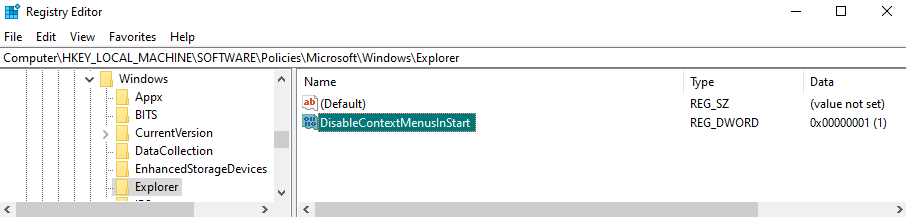
It can be done by using Registry Editor to create (REG_DWORD) DisableContextMenusInStart=1 here:
Computer\HKEY_LOCAL_MACHINE\SOFTWARE\Policies\Microsoft\Windows\Explorer
Best regards,
Adam McGuinness
Stardock Support Specialist
This is a registry setting that can be set for Windows to disable right-click context menus on the Start Menu. This beta of Start11 will now support it.
It can be done by using Registry Editor to create (REG_DWORD) DisableContextMenusInStart=1 here:
Computer\HKEY_LOCAL_MACHINE\SOFTWARE\Policies\Microsoft\Windows\Explorer
Best regards,
Adam McGuinness
Stardock Support Specialist
Do you mean
Computer\HKEY_CURRENT_USER\Software\Policies\Microsoft\Windows\Explorer
I don't have the Explorer Key in Computer\HKEY_LOCAL_MACHINE\Software\Policies\Microsoft\Windows
It was necessary to create the Explorer key, for me:

It was necessary to create the Explorer key, for me:
I created it in Computer\HKEY_CURRENT_USER\Software\Policies\Microsoft\Windows\Explorer and it works as expected.
Thanks for checking that. When I try it your way with the Current User path, it successfully disables the context menu- But, for whatever reasons is now causing some other instability and crashes. Please let us know if you get anything like that. And does it work for you the other way, under the Local Machine path?
Best regards,
Adam McGuinness
Stardock Support Specialist
I did notice that. It was screwing with DeskScapes, and caused Fences to crash.
I'll try creating the Explorer key in LOCAL_MACHINE and see if I have any issues.
EDIT: LOCAL_MACHINE key seems to work fine.
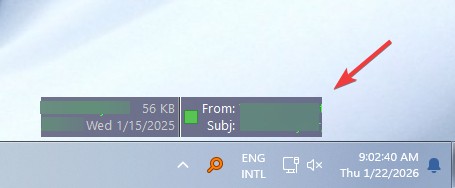
I found that everytime the program TheBat! (Mail Client) is open, the system becomes very slow
if Start11 is also installed.
When TheBat is closed the systems reacts normal after about 20 to 30 seconds.
When I uninstall Start11, all is normal.
This was also in 2.55, but I didn't assign the problem to Start11.
Hello,
Sorry to hear you are having issues. I tested TheBat! on my system, but from my short test, it was working without any slowness. Need to know more on your system.
Thank you,
Basj,
Stardock Community Assistant.
I tested on Windows 11 25H2 OS Build 26200.7462, but I don't see any slowness issue while using Start11. Perhaps, it get slow due to The Bat! has email popup notification on your new emails scroll just above your taskbar. That might causing conflict with Start11. As a test, try disable it and restart your system and see if that help.

Thank you,
Basj,
Stardock Community Assistant
Hi,
Thanks for testing.
No the popup always is disabled. Never used it.
It runs OK for some minutes, then it slows down.
Perhaps a combination with Firefox.
I have many open Firefox windows, but if only Firefox is open, there is no problem.
Only when TheBat is running after some minutes
I believe you will need to do some tests,
Thank you,
Basj,
Stardock Community Assistant
Hi! I corrected the Polish translation for Start11 version 2.56. I would like it to be useful to others, but I don't know where to publish it. Please help.
Sorry for writing in this thread. I didn't know where to write such a message.
Please review this thread to submit translations: https://forums.stardock.com/523176/. Appreciate your effort.
Thank you,
Basj,
Stardock Community Assistant
Hello,
I have a problem with the language not matching. Almost all terms are in English, even though my Windows 11 is in German. Only a few terms have been translated. The current stable version is completely in German.
Best regards
Hello,
Sorry to hear you are having issues. Perhaps, this will be resolved when the v2.6 become a release version. Appreciate your feedback and patience.
Thank you,
Basj,
Stardock Community Assistant.
All,
Start11 2.6 has been released. For details, please see:
https://forums.stardock.com/540382/get;3986520
As always, thank you for your time, feedback, and support.
Sean Drohan
Stardock Product Lifecycle Manager
Welcome Guest! Please take the time to register with us.
Select a reason for giving karma:
You're about to visit an external site:
Sign up here to get the latest news, updates, and special offers delivered directly to your inbox.