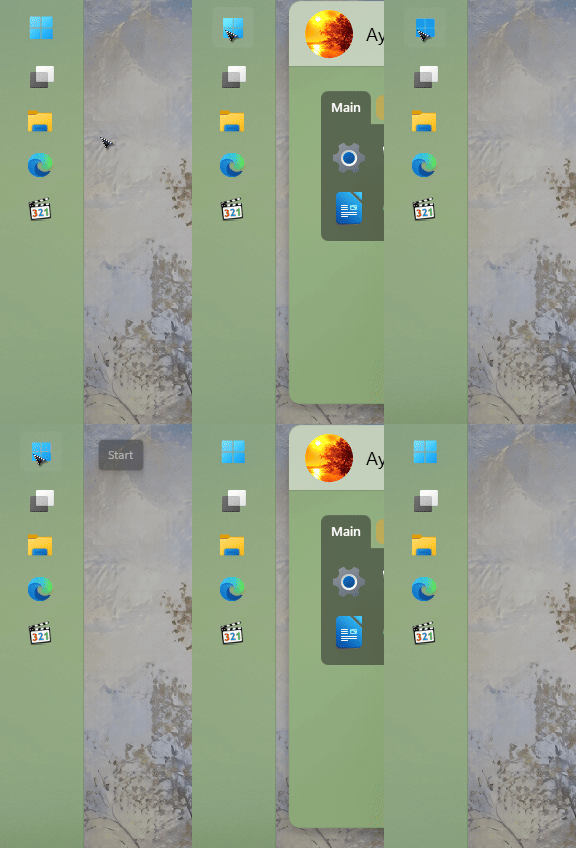
Start 11 failing to launch on secondary monitor

Windows Version Number: Windows 11 Version 25H2 (OS build 26200.9445)
App Version: 2.8

Hi there. I've noticed that Start 11 does seem to work on secondary monitors, specifically when the taskbar is set to the left side of the screen. It is working on the primary display, but only on the main display. 

227 views 6 replies
Reply #1 Top

Hello,
Sorry to hear you are having issues. I can not reproduce your issue on my system. Please try, uninstall Start11v2, reboot immediately (important), download latest version available (v2.81 Beta) in your account product download page: https://store.stardock.com/myaccount/products. Install it, reboot immediately again. Retest it and report back.

Need to know few more details.

  1. Start11 Enhance taskbar turn on or off?
  2. Taskbar auto hide turn on or off?
  3. Taskbar on the left edge for both monitors?
  4. Do you have any other 3rd party application controlling or changing something on your Taskbar?

Thank you,
Basj,
Stardock Community Assistant.

Reply #2 Top

An uninstall then reinstall did not fix the problem.

Start11 Enhance taskbar turn on or off? Off

Taskbar auto hide turn on or off? Off

Taskbar on the left edge for both monitors? Yes

Do you have any other 3rd party application controlling or changing something on your Taskbar? No.

It may be worth noting that the secondary monitor is set to "Vertical (flipped)"

Thanks.


Reply #3 Top

Sorry, I just noticed that it's worth noting that the windows key launches a start 11 style start menu, but clicking on the windows logo on the taskbar doesn't.

Reply #4 Top

This is what I see on my system.

Quoting laniganjay, reply 4147093

It may be worth noting that the secondary monitor is set to "Vertical (flipped)" 

End of laniganjay's quote

Not sure what you mean by that. Is this Windows setting? or Start11 setting?

Thank you,

Basj,
Stardock Community Assistant

Reply #5 Top

In the windows settings. To have the secondary monitor set to portrait as opposed to landscape. 

Reply #6 Top

There is a newer Start11 v2.81 Beta released recently, please download and install this version and retest your issue and report back. Beta version should be available in your account product page: https://store.stardock.com/myaccount/products
Thank you,


Basj,
Stardock Community Assistant